Wednesday, November 20, 2013

Top 10 IT-related Halloween Costumes


It's that time of year again, where the ghouls, goblins and geeks come out out to show their chops and expertise at everyone's favorite dress-up day: Halloween! (what do you mean this is a week late? It's gotta be Halloween somewhere). This is my Top 10 favorite (meaning not in any sort of subjective order) IT related Halloween costumes I could find in a simple point and click exercise throughout the Internet. Enjoy!

10
This darling little costume is of the ever "helpful" paper clip from Microsoft Word; everybody who has ever even touched Microsoft Word knows this annoying little bugger, but it's still a humorous and spot-on attempt at a recreation. 

9.

A neat costume of Norton Anti-virus that must have been an absolute pain to carry around for dear Annie here.

8.


It's a tiny-bit vague, but this costume is an 8-bit version of a human image by using makeup. 

7.


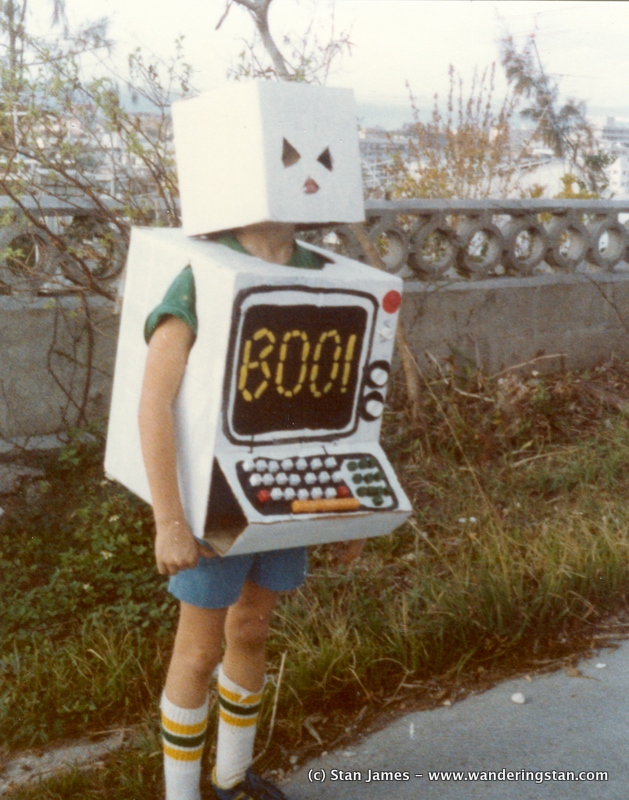
This an a classic: An older model computer that's festive for Halloween. (This entire post is making me feel like an old man)

6.

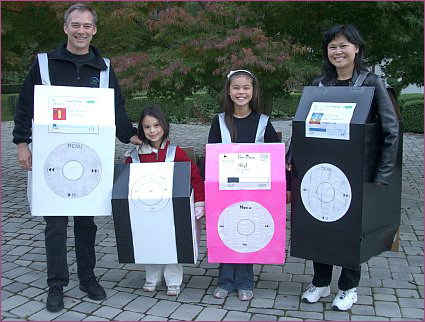
A family-costume of iPod products. (Which I can't decipher any differences in any one of them, if there are any differences)

5.


Two iPhones(?) which look startling like the real thing. 

4.


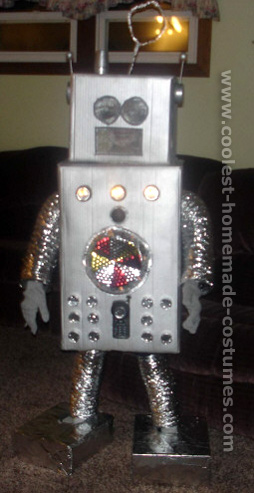
It's a robot. What more do you need?

3.


I have next to no idea what in the world this is, but it's certainly cool looking.

2.


Here's another one of those crazy things. I'm pretty sure this one is plotting world domination.

1.


This is the coolest to me. It's camera that can actually take pictures.

Tuesday, November 5, 2013

How Google has Revolutionized the World


Google is the leading search browser on the Internet, not that I even needed to divulge that information. Google as founded by Larry Page and Sergey Brin which was worked on while they were were Ph. D students at Stanford. It was admitted as a provately held company on Sept. 4 1998, which you could say was the day it was officially founded. Google is more than a search browser though, it has developed many different software and applications. The browser is one of the leading information leading in the world, giving appropriate and most desired results at the click of a button. Wanting to watch a video about whales? Well, Youtube is the place to go and it uses the Google search engine. Needing a picture of a whale? Just Google it! Need to find an aquarium where you can look at whales? Google Maps is the answer. Need a document, e-mail service, and whatever else for your unsettling whale fetish? Well, you can find them all on Google.

The term "Googling" has now become a verb. No need to "search" for anything now. You Google it. Research before the influx of the Internet was tedious, having to search books upon books and libraries upon libraries looking for just a smidgen of information about a certain subject. Now you can find any information you may need almost instantly, with sources and professional opinions.

Google has changed how people view the world, with more social interaction available, with just information and stories from one culture to another, the world has gotten a little closer, whether that's a good or bad thing is really up to interpretation. All in all, Google provides many services which has enhanced the spread of information from one person to another. Books have slowly decreased due to the advent of the Internet, specifically Google searching, so the revolution is not perfect, but it is indeed growing, or maybe, it will just get bigger and bigger engulfing everything about the human existence.

Photoshop v PicMonkey v BeFunky v SumoPaint v Psykopaint


PicMonkey: PicMonkey is an image editor program that uses seasonal image modifying, as well as a typical photo manipulator. You can edit quite a bit of your photo without having to pay for a Royale, what the premium membership is called. The program is pretty expansive in a typical photo manipulation. You can add what looks like make-up, effects, and even speech bubbles. You can do anything with it. My only two complaints are in that finding the regular manipulation option is rather difficult, in it being overshadowed by the season, in this case, monster manipulations. As well, your ability to use anything on the monster manipulation is pretty much limited to changing the color of your skin. As well, if you REALLY want to get something out of the monster manipulator, Royale only costs about $3.00 a month, which certainly isn't bad if someone were to use it often.
BeFunky: No matter what I did while using it, I could not find anything that required a premium subscription to use any of the services. It is also very expansive, with fonts, colors, and ways to manipulate photos. The process is very simple, as well, with simply a point and a click you can manipulate the photos very easily, even for someone who can barely turn a computer on without destroying everything in sight. Another nice option is the use of easily making a Facebook cover, which is one of those things that can be slightly hard to make on other services. I would recommend it, even if everything is very basic and nothing too professional. Suggested for the casual editor.

.                                  

Sumo Paint is probably the most basic painting system, at least from a free application stand-point. The amount of basic options are staggering. The user has two major options, either submitting their own photo to edit or creating their own from scratch, but it seems pretty difficult to manipulate on an amateur level. Perhaps someone with a higher artistic credibility would be able to edit it better. I spent some time playing with it, but it may be far more complicated than I can handle. The folly in technological ignorance.


Psykopaint is certainly... the most interesting of the bunch. Not necessarily a bad thing, but it takes some getting used to. The gimmick of this site is using a template of a famous artist, such as Van Gogh or Monet and editing photos in a way similar to their artistic style. It's kind of hard to use without some experience, so I wouldn't suggest it to amateurs or casual editors. I'd say this service would only be useful to those who actively want to do something creative with their pictures, while not having the skills or resources to do it by themselves.


Photoshop was pretty much the best image editing process. No more words needed.


Wednesday, October 16, 2013

Flickr v Imageshack v Photobucket


This first image was uploaded by Imageshack. The process was very fast any easy, with just a simple drag and drop with the process of grabbing the link extremely easy to do. The formatting was very large, having to be downsized in order to be used, whether this is a good or bad thing is up to the user. The quality seems to be lessened compared to the other photos, but that may just be my imagination.


Fall
This next image was uploaded via Flickr. The process was similar to that of Imageshack, but it was much harder to find the html code. It took me a few minutes, but it was relatively simple. The formatting was large, but not so large as to require downsizing much. The quality of the photo seems to have been heightened by just a bit, as I feel like I can see more detail in this photo, as opposed to the Imageshack one, but that's probably just my imagination.


 photo Fallbaby_zpse6fdae1f.jpg

This last picture was for Photobucket. The dragging and dropping method did not work on my computer, unlike the other services in this gallery. However, when I found the method to upload them, it was very simple and fast to do. Finding the HTML was very simple, just right on the side of the page. It also did an auto-copy, which was nice, but not entirely necessary.

All in all, I'd say the best for hosting pictures, is probably Imageshack, with its relatively easy to find HTML code, good quality of picture and being fast and simple to use. But, all of the processes seem at least relatively simple, so it's all about opinion.

Wednesday, October 9, 2013

3 Free Software Applications That are a Must for the Daily User

I was asked to give my opinion three FREE software applications on the web. Here are the three I chose, while all being extremely unoriginal.
1. Skype

Skype is a simple instant messaging system that can interface with a webcam to show live camera feed from one side of the screen to the other. The design is sleek and simple to look at, simply professional, so it makes people take it more serious than many of their competitors. As well, the messaging system works like a charm, with even the most basic of Internet service. One complaint about the video feed is the amount of lag one could get from a slower Internet connection, but that's mostly outside of their control. One thing that can be either grating or miraculous, it comes up as soon as the PC is turned on, so it makes the time to talk to someone just a tad shorter. One the other side of that, is that ANYONE can message you without you being able to run away from them easily.


2. Dropbox

Dropbox is a method of storing your files, be they pictures, documents, or videos. All of this is on-line, so you don't have to worry about it clogging up your computer's space. It can hold 2GB of storage, which isn't bad for something free, as well, you can earn up to 16 GBs just by referring friends, or other methods. If you pay some money for a year or annual subscription you can store up to 50, 100, 200, or even 500 GBs of storage, which is practically insane. It also has an easy method, easy even for someone who sucks at everything tech, to share files among other people, which negates the usage of a middleman, like e-mail, to send files. If you need a lot of space, but don't mind the process being entirely on-line, then this is something necessary for you.

3. Google Chrome (this may be cheating, but I really don't care. Sound off in the comments if you feel it.)

It's probably not an app, but I am an idiot, so I think it is. If you didn't already know, Google Chrome is a free to download browser made by Google (duh). The browser has a fast speed and is simple in its entity. The process is also very customizable, with the numerous amounts of apps and extensions you can add as you go along. Don't like the bookmark? Find something to replace, like Speed Dial. Hate ads? Get Ad Block. It is made for the user to have some say over how they browse the Internet. I personally don't believe the story of Chrome being significantly faster than Internet Explorer, but if you do, you won't be disappointed. Even on a slower Internet connection, it works fine, during my time using it, I've rarely had the problem of waiting forever for a page to load, but it does seem to like not loading the page at all. But, at least, it shows it to you fast. 

Tuesday, October 8, 2013

Critiques of Classmates

Now, as a disclaimer, my blog is awful, so I have no right to judge any of these people for anything on their blogs. But, I will anyway. If I find any, but usually I can only find nice things to say about people's things. (Click the names to see the blog)

Christopher Ball:

The blog is easy to read, with the background not being too gaudy. I like the use of personal stories to make it more inviting to others. The only thing I may dislike about the blog is that the personal blogs seem to captivate me more than the assigned blogs do, but nothing really wrong there.


Loremli Batausa:

I like the amount of depth that your posts go into, it makes it sound like you really do know what you're talking about. You have excellent pictures, mixing helpful with humorous, so it's all in all, a very nice, well-put-together blog.

Allyson Brewer:

I like your use of of pictures, they make things pop easily, while being helpful in some and humorous in others. It's also very easy to navigate and the layout is nice to look at.

Alexis Bryant:

The colors are nice and pretty to look at. The only problem I could ascertain would be to fix the broken links throughout the page. Make sit look somewhat unprofessional. (Considering I'm practically incapable of turning on a computer, it's not something to be too self-conscious about.)

Ted Grubb:

My problems are only superficial; the page needs some type of color in my opinion, it's very uninteresting to look at.  Also, the title needs to be changed.

Robert Heck:

The font and color of the text is seriously grating to me, and sometimes hard to read. I would change that and go for something a little more traditional looking.

James Hill:

The only thing I have to say is that the font and pictures are wayyyyyy too big. It makes it so much harder to read the page. Other than that, it's fine.

Tyler Jimison:

The design is very plain, maybe add some color or change the layout a bit. The posts themselves are nice and thorough with good pictures. You also need to fix the side bars, they are very plain and show nothing about you.

Jane Johnson:

The page needs to see a little more of yourself, such as an introduction and a picture. I also think that there may be too many pictures, because it seems to be clogging up the page.

Scotty Johnson:

The layout is missing a few things, namely some design to it, it feels too impersonal. It also needs to have an introduction about yourself. Otherwise, things are fine.

Amber Ross:

I really like your page design, probably my favorite of any of them. It's easy to look at, interesting, and ultimately, very inviting. I like the use of humor and personal bits about yourself; makes it seem like someone is actually writing it. Granted: I really don't see the use of the calender.

Christopher Whitt:

This is the same blog design I've seen for the third time. Not a critique against you, but maybe at least one of ya'll should change your designs a bit. You have the same problem as me; I think maybe you don't like pictures. I'm worse, but you could still add a few more to your posts.

Wednesday, October 2, 2013

Ways to Use Evernote and Skitch


Evernote is an app that can be used to take pictures or articles found on the Internet and save them for later use. Skitch is a distaff-counterpart to it; where you can take the pictures and articles (as well as your own files and pictures) to edit them with text boxes, pointer arrows, and colors. What can you use it for? Well, that's just it, it can literally used for anything. You need to make detailed instructions for a recipe you found on the Internet? Done, tag it on Evernote and send it over to Skitch where you can write down what you need to do, and in what order, as well as helpful personal tips. It's not a complicated app, even for someone as technology-impaired as I. Granted: I only understand the most bare of uses, there are tons of varieties of options to use them for. I can guarantee that they are useful apps, but they're only as useful as how the person uses them. Try it yourself!